Types of Google Ads — campaign types and when to choose which

Google Ads lets you display adverts in the search engine, on YouTube, in Gmail, on Maps, in apps, on websites and alongside specific products. This does not mean, however, that every business should run all of the available campaign types.
A service business whose customer types "air-conditioning installation London" needs a different advert from a shop with 10,000 products. A new brand whose audience does not know it and does not search for it by name needs to be promoted differently again.
There is no single best type of Google Ads campaign. Search helps you capture existing demand. Shopping shows specific products with a price and an image. Demand Gen and Video can spark interest, while Performance Max draws on multiple channels and greater automation.
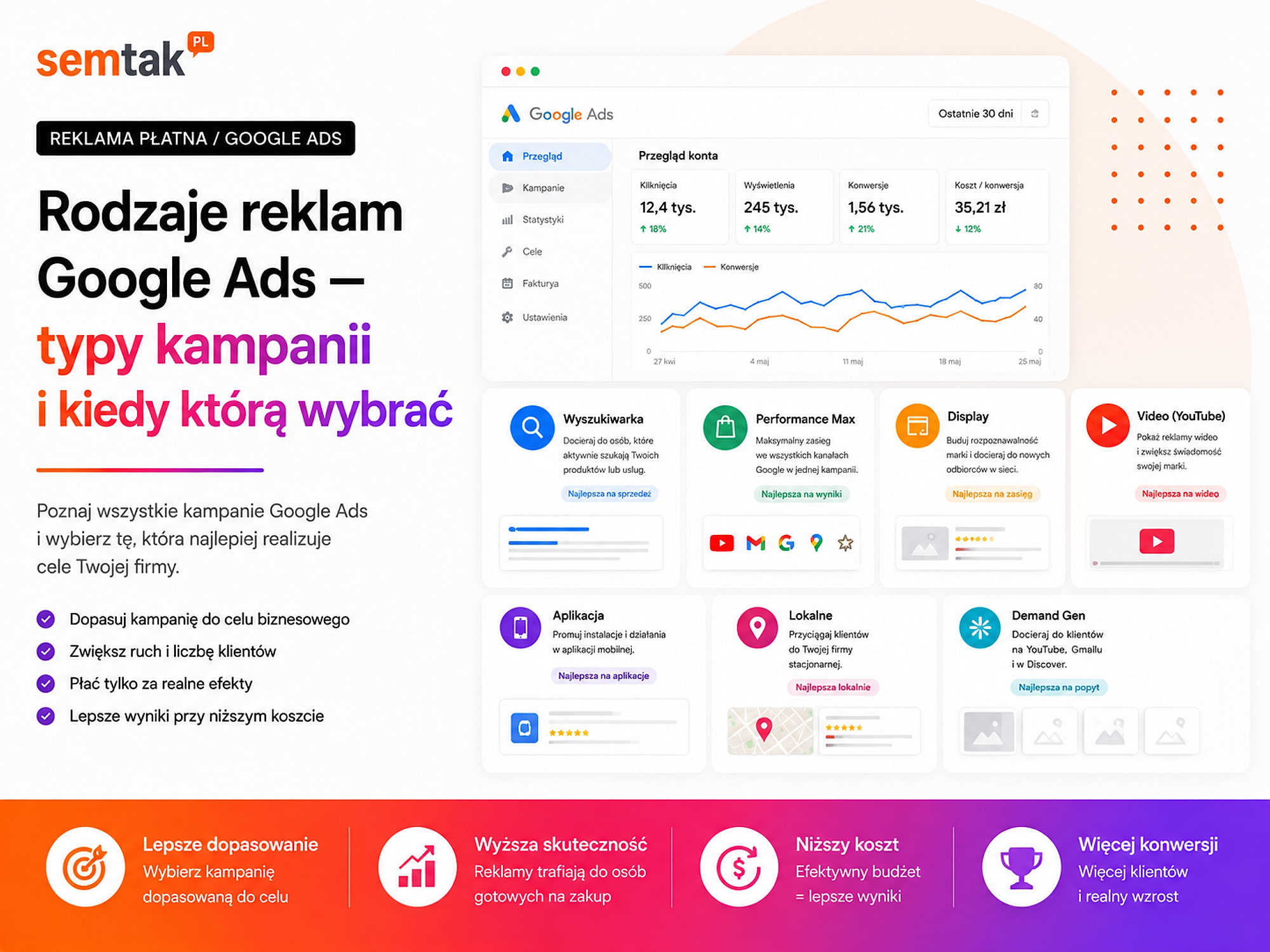
In this guide we explain how Google Ads campaign types differ, where the adverts appear and when to choose Search, Shopping, Performance Max, Demand Gen, Display, Video or a campaign promoting an app.
In short
| Business need | Most often the right direction |
|---|---|
| Customers are actively searching for the service | Search |
| A shop wants to show specific products with a price | Shopping |
| A shop has a tidy feed and wants to grow scale | Performance Max |
| A brand wants to interest new audiences with visual material | Demand Gen |
| A business wants to reach earlier users again | Display, Demand Gen or Video |
| A product or service needs to be shown and explained | Video |
| A business is promoting a mobile app | App |
| A local micro-business needs a simple start | Search or Smart |
| The goal is visits and actions tied to a physical location | Performance Max with local goals |
The most important Google Ads campaign types are:
- Search — adverts in the search results.
- Shopping — product adverts with an image and a price.
- Performance Max — a campaign running across many Google channels.
- Demand Gen — visual adverts on YouTube, in Discover and Gmail, among others.
- Display — graphic adverts on websites and in apps.
- Video — video campaigns run mainly on YouTube.
- App — campaigns promoting a mobile app.
- Smart — simplified campaigns intended for basic use cases.
A business can combine several campaign types. Each of them, however, should have a specific role, its own budget and a correctly set up way of measuring results.
In short (TL;DR)
- The campaign type determines the placements, the available settings and the level of automation.
- Search responds above all to existing demand and specific queries.
- Shopping uses product data sent to Google Merchant Center.
- Performance Max works across many channels, but it needs correct conversions and good data.
- Demand Gen works well for building interest visually.
- Display is often used for remarketing and reach campaigns.
- Video helps you show a product, a process, an expert or the customer's problem.
- Remarketing is not a separate campaign type but a way of targeting adverts.
- AI Max is not a separate type of advert — it is a set of features within Search campaigns.
- With a limited budget it is better to run one or two well-chosen campaigns than several underfunded ones.
Campaign type, goal and ad format — how do they differ?
These three concepts are often used interchangeably, even though they describe different elements of the system.
The campaign type determines above all where the advert may appear, which data will drive the system, which formats can be used and how much control remains with the advertiser. Examples are Search, Shopping, Display and Performance Max.
The campaign goal states what result the business wants to achieve — a sale, a lead, a phone call, a booking, traffic to the site, recognition, an app install or a visit to a location. Simply choosing a goal in the panel does not mean the system is measuring it correctly. If you set the opening of a contact page as your main conversion, the algorithm may generate many "conversions" even though the business does not receive a single enquiry.
The ad format determines the appearance of a specific advert: a text advert, a product with an image and a price, a graphic, a carousel, a video or an app advert. One campaign can use several formats — Performance Max, for example, uses text, graphics, logos, videos and product data.
What are the types of Google Ads campaign?
1. Search — a campaign in the search engine. A Search campaign displays adverts to people typing queries into Google, for example "accountancy for a limited company", "air-conditioning servicing Manchester", "made-to-measure office furniture", "loft-style lamp shop", "WooCommerce implementation". The user usually already knows what they need — the campaign answers the query that was entered and leads them to the right page.
When should you choose Search? It makes sense when customers are actively searching for a product or service, when specific purchase queries can be defined, when the business has separate pages for its most important services, when forms/calls/sales can be measured and when control over the message and the topic of the traffic is needed. Example: a business installs air conditioning in London, the customer types "air-conditioning installation London price", and the advert can lead directly to a page describing the scope of the service, the area served, example units, the delivery process and a quote form — that is a better direction than sending every user to the home page.
When might Search not be enough? Search draws on demand that already exists. If a business sells a solution that customers do not yet know or cannot name, the number of valuable searches may be small — in that case it is worth also considering Demand Gen, Video, educational content and activity in other channels. The most common Search problems: query matching that is too broad, a lack of negative keywords, mixing many services in one campaign, adverts leading to the home page, incorrectly set conversions and no analysis of search terms.
Is AI Max a separate type of campaign? No. AI Max is a set of features available in Search campaigns — it can broaden query matching, adjust ad text and direct users to selected subpages. It should not be presented as a separate campaign type alongside Search or Performance Max. Automation also does not relieve you of control over queries, destination URLs, messaging, brands and conversion results.
2. Shopping — product campaigns. Shopping campaigns are intended for online shops. The advert can include a product image, the name, the price, the shop name, promotion information and delivery data. The basis of the campaign is the product feed sent to Google Merchant Center, containing among other things the product title, description, price, availability, image, brand, GTIN or MPN, variant and the product page URL.
When should you choose Shopping? It makes sense when the business runs an online shop, the products can be bought directly on the site, prices and availability are up to date, Merchant Center is correctly configured, the images present the products well, and the shop measures purchases and the value of transactions. The customer types "beige upholstered dining chair" and, even before entering the shop, can see a photo of the chair, the price, the product name and the seller's name — they compare specific offers, not just ad text.
Why is the product feed so important? Google uses the product data to understand which searches the advert may appear for. The unclear title "Chair K44" says less than "Beige upholstered dining chair K44" — the second name informs the customer and the system more quickly about what is on offer. The most common Shopping problems: the price in Merchant Center differs from the price in the shop, a product is marked as available even though it cannot be bought, variants have incorrect identifiers, images are low quality, titles do not describe the product, all products are advertised identically and the campaign does not take margin into account. We describe the detailed differences in the guide product advertising on Google — Shopping and Performance Max. If a shop needs Merchant Center configuration, feed repair and ongoing ad management, you will find the scope of work on the Google Shopping campaigns page.
3. Performance Max — a multi-channel campaign. Performance Max (PMax) is a campaign focused on a specific goal and operating across many Google channels — it can display adverts in the search engine, on YouTube, in Gmail, in Discover, on Maps, in the Display Network and in product results, among others. The business gives the system its conversion goals, budget, text, images, logos, videos, audience signals and, optionally, a product feed, and Google automatically chooses combinations of assets, placements and bids.
When should you choose Performance Max? It makes more sense when conversions are measured correctly, when the business knows the value of its sales or can assess leads, when the account has a sufficient budget and data, when good assets are available, when the landing page works correctly, when the shop's product feed has been tidied up and when the business wants to operate in several channels at once. For a shop the campaign can use Merchant Center and promote products across various surfaces — before launching, you should check prices, availability, variants, images, product titles, the measurement of purchase value, transaction identifiers and the division of products by margin and importance. For leads PMax can acquire forms, calls and other enquiries, but the sheer number of leads is not enough for an assessment — the system should receive information about which enquiries were correct, qualified, ended with an offer and ended with a sale. Without CRM data, the campaign may increase the number of cheap forms with no value for the salesperson.
Does Performance Max replace Search? Not always. Search gives more control over queries, the structure of services, adverts for specific needs and landing pages; Performance Max operates more broadly and uses more automation. A common model is Search for the most important queries and Performance Max as a campaign that increases scale. We describe the full scope of configuration and management on the Performance Max page.
4. Demand Gen — a campaign that builds interest. Demand Gen uses visual ad formats on surfaces such as YouTube, YouTube Shorts, Discover, Gmail and the Google Display Network — it can use graphics, videos, carousels and product data. The user does not need to be searching for a product at that moment; the advert reaches them while they are watching or browsing content.
When should you choose Demand Gen? It makes sense when a product needs to be shown, when a business wants to reach new audiences, when a brand has good visual material, when demand still has to be built, when the customer makes a decision over a longer time, or when the campaign is meant to reach earlier users again. Example: a shop launches a new line of garden furniture; the customer may not yet be typing a specific product query, but they may see a video or carousel showing a patio arrangement, then visit the shop, browse the products, return via Search or remarketing and place an order. Demand Gen therefore often works earlier than a Search campaign.
Demand Gen and the older Video Action campaigns. In older guides you may come across the term Video Action Campaigns — their conversion uses have been moved to Demand Gen, so when creating a new campaign it is not worth relying on instructions about the retired model. The most common Demand Gen problems: weak or repetitive material, audiences that are too broad, expecting immediate sales, no separate assessment of new and returning users, and analysis based on clicks alone.
5. Display — graphic adverts. Display campaigns show adverts on websites, in apps and on selected Google surfaces. Most often the business provides headlines, descriptions, images and logos, and the system creates flexible adverts from them, adapted to the available space. Display is used above all for remarketing, reminding people about an offer, building reach, promoting content and supporting a longer purchase process.
Remarketing example: a customer views a product but does not place an order, and a few days later they may see an advert while using another site or app. Well-set remarketing should control the frequency of display, how long a user stays on the list, the exclusion of buyers, the quality of placements and the matching of the message. When does Display work poorly? Most often when the audience is too broad, the business expects immediate sales, the adverts are unclear, the traffic lands on the home page, or the campaign is judged solely on cheap clicks. A low CPC does not mean a good result if users do not take any valuable action.
6. Video — campaigns on YouTube. Video campaigns serve to display video material primarily on YouTube and can support building reach, brand recognition, the number of views, interest in the offer, traffic, conversions and remarketing. The advert can appear before a video, during a video, in Shorts, in recommendations and in YouTube results.
When should you choose Video? It makes sense when a product or service needs to be shown in action, a problem explained, a project presented, an expert shown, a process demonstrated or trust built. B2B example: a business implements a warehouse system, and the text "warehouse process automation" may be too general — a video can show receiving an order, passing it to the warehouse, updating stock levels, preparing the shipment and reporting, so the audience understands more quickly what they are paying for. When does Video not have to be the first choice? When the budget is very limited, the business has no material, customers are already searching intensively for the service, or quick enquiries are needed — in that case the first stage may be Search, and Video supports brand building and remarketing later.
7. App — campaigns promoting apps. App campaigns are intended for businesses that have a mobile app and can be geared towards installs, registrations, user activity, in-app purchases or re-engaging the app. The adverts can appear in the search engine, on Google Play, YouTube, Discover and the Display Network, among others. When should you choose an App campaign? When the business has a working app, correctly implemented event measurement, defined valuable actions, ad material and a prepared app page in the store. An install is not always the right goal — a large number of downloads looks good in a report, but creating an account, the first order, buying a subscription, regular use or the value of a user may be more important.
8. Smart — simplified campaigns. Smart campaigns are a simplified solution intended mainly for small businesses — Google automates a large part of the settings in them, including targeting, bids, query matching and placements. When can Smart make sense? When the offer is simple, the budget small, the owner wants to launch a basic advert, simplicity is the priority and the account will not be developed intensively. Simplification usually means less control over queries, account structure, bids, tests, reports and segmentation. A business planning to scale its advertising regularly more often needs the full Google Ads mode and standard campaigns.
What about local adverts?
In older guides you may come across a separate "local campaign" type. Goals tied to a location can now be handled, among other things, by Performance Max with local goals. Such activities can concern getting directions, clicking a phone number, a visit to the shop, in-store sales and the promotion of a specific location. A local business can also use Search, location assets, the Google Business Profile, adverts on Maps and Smart campaigns.
Remarketing is not a separate campaign type
Remarketing is a way of targeting adverts at people who previously visited the site, viewed a specific product, added a product to the basket, watched a video, used an app or are in the customer database. It can be used in Display, Demand Gen, Video, Search, Performance Max and App.
Dynamic remarketing. In a shop, the advert can show the product a user previously viewed. For it to work correctly you need a product feed, correct product identifiers, tagging, audiences, the proper consents and the exclusion of people who have already bought. You will find more about how this mechanism works in the guide Google Ads remarketing.
How can the individual campaigns complement each other?
In practice, campaign types do not always compete with each other — they often serve different stages of the customer's decision. Example for an online shop:
- Demand Gen or Video shows the product to people who did not know it before.
- Search captures the user when they start searching actively.
- Shopping lets them compare specific models, prices and images.
- Performance Max helps increase the number of conversions across many surfaces.
- Remarketing reaches people who did not complete the purchase again.
This does not mean all campaigns should be launched at once. With a limited budget it is worth starting with the activities closest to the sale and then adding campaigns responsible for earlier stages of the decision.
Search and Demand Gen. Search responds above all to existing demand — the customer types "warehouse software for an online shop". Demand Gen can work earlier, showing material such as "Why does updating stock by hand cause errors in orders?". The first campaign answers a ready-made need, the second helps the audience notice the problem and learn about the solution.
Performance Max and Demand Gen. Performance Max is focused mainly on achieving conversion goals using many channels; Demand Gen puts more emphasis on visual reach, product discovery and working with audiences. Put simply: Performance Max — increasing the number or value of conversions; Demand Gen — sparking interest and prompting further action.
How to choose the type of campaign?
Step 1. Define a real result. Do not start with the goal "we want more traffic". Better goals are a purchase of a defined value, a lead qualified by a salesperson, a booking, a phone call, a visit to a location or an install combined with app activation.
Step 2. Check whether customers are searching actively. Ask the question: can the potential customer name the need and type it into Google? If so, the natural starting point is Search or Shopping. If not, Demand Gen, Video or Display may be needed.
Step 3. Assess the available material and data. Search requires above all good landing pages, text adverts and the right structure of services. Shopping requires a feed, images, prices, availability and Merchant Center. Demand Gen, Video and Performance Max need good visual material. An App campaign requires correct measurement of actions inside the app.
Step 4. Check the conversions. Before launching a campaign, check when the conversion fires, whether the purchase passes a value, whether the currency is correct, whether transactions are not duplicated, whether the form is counted after it is sent and whether the lead quality from the CRM can be passed back. We describe the detailed process in the guide conversions in Google Ads — how to measure them correctly.
Step 5. Match the number of campaigns to the budget. If a business has a limited budget and splits it between Search, Shopping, Performance Max, Display, Demand Gen and Video, each campaign may receive too little traffic and data. It will then be hard to judge what is working, what needs improvement, where to increase the budget and whether the algorithm had the conditions to learn. With a limited amount, it is better to start with the campaign closest to the purchase decision. You will find more about planning a budget in the guide how much Google Ads costs.
Which campaign for which type of business?
A local service business (plumber, building firm, workshop, clinic, equipment service). It is most often worth starting with Search, location assets and measuring calls and forms. Performance Max with local goals may be the next stage, once the business has the right data and wants to grow scale.
An online shop. The most common start: Shopping, Search for important categories and brands, Performance Max once Merchant Center has been tidied up. Later you can add Demand Gen, Video and remarketing.
A B2B business. Search for specific problems and services usually works, together with measuring lead quality in the CRM and remarketing to people who visited important pages. Demand Gen and Video can support a longer decision process, especially when the service requires education.
A new consumer brand. If no one knows the brand or the product, Search alone may have limited reach — Demand Gen, Video, visual material, reach campaigns and remarketing can play a role. Search captures the demand that arises after contact with the brand.
A business with a mobile app. The basis is an App campaign and the correct measurement of installs, registrations, activations, purchases and user value.
Decision table — which type of campaign to choose?
| Question | Search | Shopping | Performance Max | Demand Gen | Display | Video | App |
|---|---|---|---|---|---|---|---|
| Is the customer searching actively? | Yes | Yes | Partly | Not necessarily | Not necessarily | Not necessarily | Not necessarily |
| Does the campaign require a product feed? | No | Yes | In e-commerce | Optionally | For dynamic remarketing | No | Optionally |
| Are graphic assets needed? | Optionally | Product images | Yes | Yes | Yes | Thumbnail and video | Yes |
| Is a video needed? | No | No | Recommended | Video or graphic | No | Yes | Recommended |
| Does the campaign work across many channels? | Mainly the search engine | Product surfaces | Yes | Yes, visual | Display Network | Mainly YouTube | Yes |
| Does it give control over queries? | The most | Limited | Less | No | No | No | No |
| Does it help build demand? | To a limited extent | To a limited extent | Partly | Yes | Yes | Yes | Yes |
| Can it be used in remarketing? | Yes | Indirectly | Yes | Yes | Yes | Yes | Yes |
Four mistakes when choosing a campaign type
1. Choosing a campaign just because the panel recommends it. The Google Ads panel may suggest a campaign with more automation, but it does not know the full situation of the business — it does not automatically take into account margin, lead quality, service problems, stock limits or the owner's priorities. The campaign type should follow from the business model, not solely from a prompt in the interface.
2. Expecting immediate sales from a demand-building campaign. Display, Demand Gen or Video often reach people who are only just learning about the problem or product — they should not be judged in exactly the same way as Search on purchase queries. You still have to control the quality of the audience, the frequency, later visits to the site, assisted conversions and the real impact on sales.
3. Mixing new customers, remarketing and brand queries. A campaign may look very profitable because it takes over people who already know the brand, previously visited the site, typed the company name or were close to buying. You have to separate the role of acquiring new customers, remarketing, handling brand queries and closing existing demand.
4. No data on lead quality and real sales. Google Ads sees the form but does not automatically know whether the enquiry ended in a contract. Without CRM data, the algorithm may increase the number of easy-to-acquire forms that rarely lead to a sale. In service businesses it is worth passing back information about qualified leads, prepared offers, contracts and the value of sales.
What can you check yourself?
1. List the active campaigns. For each one, note the type, goal, budget, main conversion, landing page and role in the purchase process. If you cannot describe a campaign's role in one sentence, its goal may be too unclear.
2. Check the main conversions. Make sure the campaigns are not optimised towards visiting the contact page, scrolling the page, clicking any button or starting a form without sending it.
3. Compare the campaign with customer behaviour. Ask the questions: is the customer already searching, are they only just learning about the problem, did they view the product earlier, are they comparing offers, do they know the brand.
4. Check the landing pages. An advert for a specific service should lead to the page for that service, and a product advert to the right product or chosen variant.
5. Check the material. For visual campaigns, verify horizontal and square formats, vertical graphics, logos, text, videos and the consistency of the material with the offer.
6. Check Merchant Center. In a shop, see how many products are approved, whether prices match, whether availability is up to date, whether variants are correct and whether products do not have incorrect identifiers.
7. Check the search terms. In Search, check the users' actual queries — the keyword configured in the campaign is not always the same as the customer's search term.
8. Compare leads with the sales result. Set forms, qualified leads, offers, signed contracts and revenue side by side. A cheap form is not always a good lead.
9. Check ad frequency. In Display, Video and Demand Gen, verify that the same person is not seeing the advert too often.
10. Assess budget fragmentation. If several campaigns each receive single clicks and do not gather conversions, the account may need to be simplified.
When is it worth handing this to a specialist?
A specialist's help is justified when you do not know which campaign type matches the business's goal, when the account contains many campaigns with no clear division, or when the budget grows without control over profitability.
Consider support when you do not know which campaign type matches the business's goal, the account contains many campaigns with no clear division, Performance Max produces a result but its source is hard to identify, leads are cheap but the salespeople rate them as weak, Merchant Center rejects products, Search shows adverts on random queries, remarketing does not exclude buyers, conversions are counted twice, Google Ads does not receive CRM data, the budget grows without control over profitability, or it is unclear whether the problem lies in the campaign, the measurement or the page.
Choosing the campaign type is only one element of the work — you also have to set up measurement, account structure, budget, material, landing pages, audiences, profitability, a testing schedule and reporting. We describe the full scope in the guide running Google Ads campaigns — what it covers and how it works.
Frequently asked questions
What are the main types of Google Ads campaign?
The most important types are Search, Shopping, Performance Max, Demand Gen, Display, Video and App. Simplified Smart campaigns and Performance Max configurations for local goals are also available.
Which Google Ads campaign is best to start with?
If customers are actively searching for the service, it is often worth starting with Search. A shop can start with Shopping. The final choice depends on demand, budget, material and the quality of measurement.
How does Search differ from Performance Max?
Search focuses on queries in the search engine and gives more control over structure and messaging. Performance Max operates across many channels and uses more automation.
How does Shopping differ from Performance Max?
Shopping concentrates on product adverts and allows more precise control of the catalogue structure. Performance Max can use the same feed but shows adverts across more channels.
Is remarketing a separate campaign type?
No. Remarketing is a way of targeting adverts at earlier users. You can use it in Display, Demand Gen, Video, Search and Performance Max, among others.
Is AI Max a separate campaign type?
No. AI Max is a set of features available in Search campaigns. It broadens the automation of query matching, text and landing pages.
Should a small business run Performance Max?
It can, but first it needs correct measurement and a clearly defined goal. With a small budget, a simpler Search campaign can provide clearer data.
Do you have to run several campaign types at once?
No. With a limited budget it is better to run one or two types with a clearly defined role. It is worth adding further campaigns only once you know what problem they are meant to solve.
Match the campaign type to the customer, not to the panel
The choice of a Google Ads campaign should follow from customer behaviour, not from which type is most heavily promoted in the panel. The simplest split: Search — the customer is searching actively; Shopping — the customer is comparing specific products; Performance Max — the business wants to increase the scale of conversions across many channels; Demand Gen — interest has to be built with visual material; Display — remarketing or broader reach is needed; Video — the offer has to be shown or explained; App — the goal is installs and active app users; Smart — simplicity of configuration is the priority.
Not every business needs all campaign types. Before launching an advert, establish: what result the campaign is meant to bring, whether customers are already searching for the offer, what material is available, whether conversions are measured correctly, whether the budget is enough to gather data, whether the page is ready for traffic and whether you can assess lead quality or the profitability of sales.
If you do not know whether Search, Shopping, Performance Max or Demand Gen is better for your business, as part of running Google Ads campaigns we can analyse demand, the offer, measurement and budget. Instead of launching all available campaigns, we choose the ones that have a clearly defined role and can be assessed fairly.