Core Web Vitals in a WooCommerce Store — What They Are and Why They Affect Sales

A customer lands on a product page, but the image takes a few seconds to load. They try to choose a variant, yet the store does not react. When they want to click "Add to cart", the layout suddenly shifts and they hit a different button.
Each of these problems is described by one of the Core Web Vitals metrics.
Core Web Vitals show how users perceive a page in action: whether the most important content appears quickly, whether the store reacts smoothly and whether its layout stays stable.
For a WooCommerce owner this is not purely a technical topic. A poor score can mean that the customer gives up before viewing the product, cannot comfortably use the filters, or abandons the purchase because of a slow cart.
In this guide we explain what LCP, INP and CLS are, how they affect sales and what most often worsens the results of a WooCommerce store.
In short
Core Web Vitals are three metrics with which Google assesses the real user experience: LCP (how quickly the main content loads), INP (how quickly the page reacts to clicks) and CLS (whether the layout does not jump). In a store they translate directly into sales — a slow-loading product and a jumping "Add to cart" button discourage the customer. Improvement starts with images, hosting and limiting heavy scripts. We gathered the specific market data and the measurement methodology in the Core Web Vitals of WooCommerce stores 2026 report.
TL;DR
- Core Web Vitals measure loading speed, page responsiveness and layout stability.
- The three main indicators are LCP, INP and CLS.
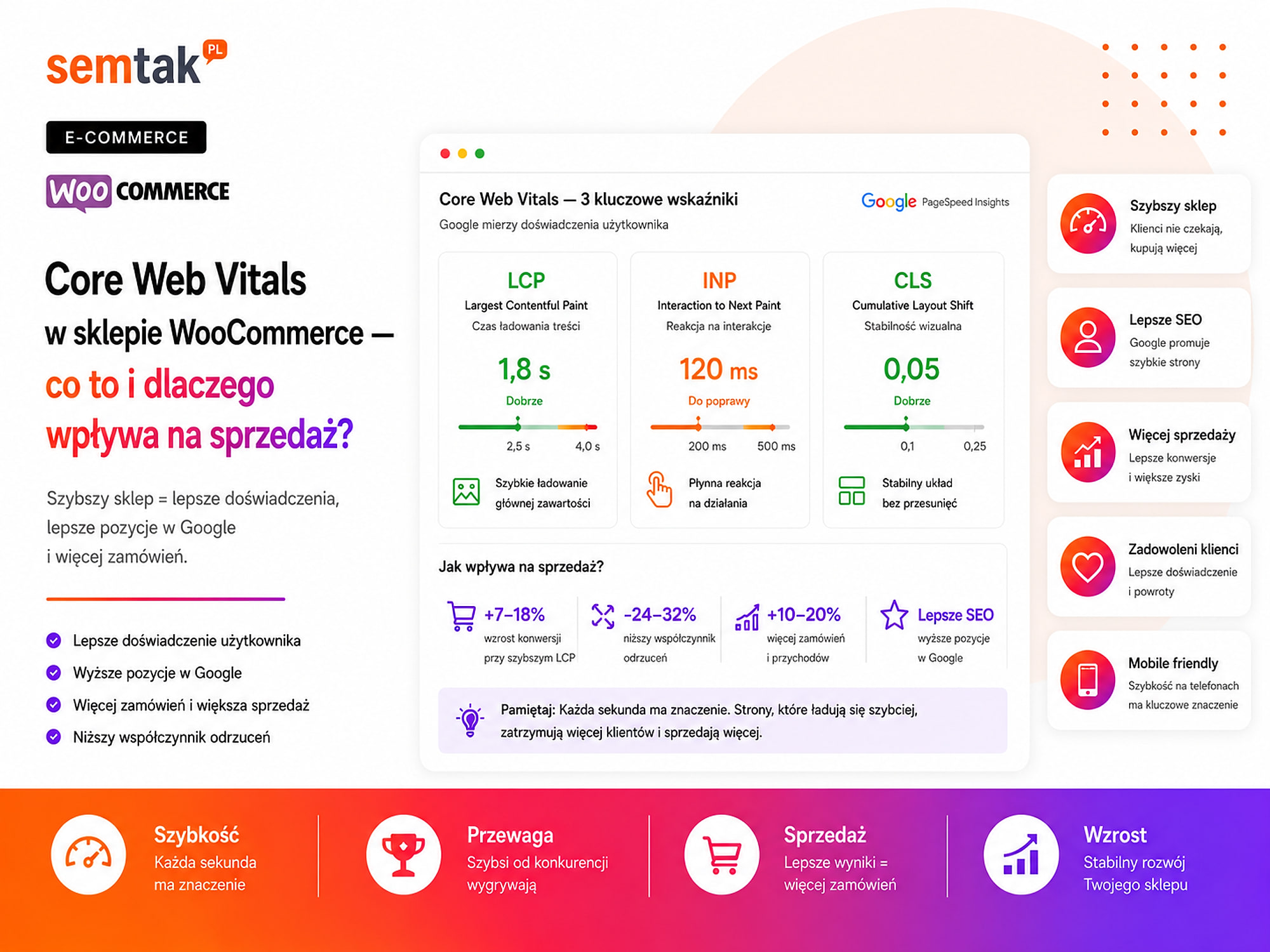
- A good score is LCP up to 2.5 s, INP up to 200 ms and CLS up to 0.1.
- Core Web Vitals are part of the page experience, but on their own they do not guarantee a high position in Google.
- Poor results can make it harder to view products, use filters and place orders.
- Checking the home page is not enough — the category, product, cart and checkout must be tested separately.
- The PageSpeed score alone does not yet tell you exactly what needs to be fixed.
What are Core Web Vitals?
Core Web Vitals are three indicators measuring the user experience while a page loads and is used.
Google currently uses three core metrics:
- LCP — how quickly the largest element appears,
- INP — how quickly the page reacts to a user action,
- CLS — layout stability during loading.
In a WooCommerce store they can be translated into three simple questions:
- How quickly will the customer see the main product content?
- How quickly will the store react to a click?
- Will the page elements stay in place?
| Metric | What does it measure? | Good score | Example in WooCommerce |
|---|---|---|---|
| LCP | How quickly the main content appears | up to 2.5 s | Loading the product image or a banner |
| INP | The page's reaction to user actions | up to 200 ms | Choosing a variant, a filter, adding to cart |
| CLS | Layout stability | up to 0.1 | No shifting of price, image and buttons |
A store passes the Core Web Vitals assessment when all three indicators fall within the good range for most measured visits. So it is not about one perfect test performed on a fast computer in the office. What counts is the experience of users on different phones, networks and locations.
What does LCP measure?
LCP measures how quickly the user sees the largest visible element of the page, for example the product image or the main banner.
LCP stands for Largest Contentful Paint. On a WooCommerce product page the largest element is often the main product image, a gallery graphic, a large heading or a promotional banner. A good LCP score is at most 2.5 seconds.
What does poor LCP look like from the customer's perspective? The customer opens the product page. They see the heading and part of the text, but the main image is still loading. They do not yet know what the product looks like, what colour it is, whether it matches the image from Google and whether it is worth reading the rest of the description. They may wait. They may also go back to the search results and open a competitor's offer.
What most often worsens LCP? The most common causes are a product image that is too large, a slow server response, the lack of effective caching, and a heavy slider or theme. Cache is a remembered, ready version of the page, thanks to which the server does not have to build it from scratch every time.
Example
The main product image is 4000 × 4000 pixels and weighs 4 MB, yet in the store it is displayed at a width of 700 pixels. So the customer downloads a much larger file than is needed to show the product. On a fast connection the problem may be barely visible — on a phone and a weaker network the image becomes the main bottleneck.
What does INP measure?
INP measures how quickly the page responds to a click, a touch of the screen or the use of the keyboard.
INP stands for Interaction to Next Paint. A good INP score is at most 200 milliseconds. In a WooCommerce store this metric matters, among other things, when:
- using filters,
- choosing a variant,
- adding a product to the cart,
- opening the mini-cart,
- entering a discount code,
- choosing delivery.
What does poor INP look like from the customer's perspective? The customer presses "Add to cart", but for a moment nothing happens. They do not know whether the click was registered, so they press the button again. After a while there are two units of the product in the cart. A similar problem can occur with filters — the user chooses a brand or size, but the product list does not react. The store gives the impression of having frozen.
What most often worsens INP? The most common causes are a large amount of JavaScript code, a heavy page builder, elaborate AJAX filters, and numerous chats, popups and marketing scripts.
What is AJAX?
AJAX is a way of updating a fragment of a page without a full reload. In WooCommerce it is used, among other things, in filters, the cart and the choice of variants. AJAX itself is not the problem — it appears when, after every click, the store does too much work or waits for a slow server response.
What does CLS measure?
CLS measures whether page elements shift during loading without any action from the user.
CLS stands for Cumulative Layout Shift. A good CLS score is at most 0.1. In practice this concerns situations where:
- the text suddenly shifts downwards,
- a button changes position,
- an image expands the layout,
- a banner appears above the content,
- the price jumps after the variant loads.
What does poor CLS look like from the customer's perspective? The customer wants to press "Add to cart". At the same moment a message appears above the button or an image finishes loading. The button shifts, and the user accidentally clicks a different element. On an informational page this is irritating. In a store it can lead to choosing the wrong variant, accidentally closing a message, clicking the wrong element or interrupting the purchase.
What most often worsens CLS? The most common sources of the problem are images without a defined width and height, banners loaded above the content, a consent bar that changes height, and a price or widget loaded in late.
Are TTFB, FCP and the PageSpeed score part of Core Web Vitals?
No. Core Web Vitals are currently LCP, INP and CLS, but other indicators help to find the cause of a poor score.
In reports you can also come across:
| Abbreviation | What does it mean? | What is it useful for? |
|---|---|---|
| TTFB | Time to First Byte | Shows how quickly the server starts to respond |
| FCP | First Contentful Paint | Measures the appearance of the first content |
| TBT | Total Blocking Time | Helps diagnose the page being blocked by JavaScript |
| Speed Index | Speed of the visual appearance of content | Helps assess the laboratory loading of the page |
Why is TTFB important in WooCommerce? TTFB is not formally a Core Web Vital, but it can affect LCP. If the server takes a long time to prepare the response, the browser later starts downloading the page code, images, styles, scripts and fonts. In WooCommerce this is especially important on dynamic pages such as the cart, the customer account, placing an order and pages with individual B2B prices. Not every such page can be saved in an ordinary cache, because its content depends on the specific user.
Does a PageSpeed score of 100 mean a perfect store? No. The PageSpeed score from 0 to 100 is a laboratory performance assessment calculated on the basis of several indicators. It is useful, but it is not the same as passing Core Web Vitals with real users. So situations are possible in which:
- the laboratory test gives a high score, but users still have poor LCP,
- a single address does well, but the categories are slow,
- the home page is fast, but the cart works badly,
- desktop has a good score, while the mobile version fails the assessment.
The goal should not be to score 100 points at any cost. The goal is to remove the problems that get in the customers' way and limit how the store works.
Why do Core Web Vitals affect sales?
Core Web Vitals affect sales because they describe the moments in which the customer views the product, uses the store and makes a purchasing decision.
You do not need to know the names of the metrics to feel their effects. The customer simply notices that the store takes a long time to open, does not react, jumps, makes it harder to choose a product or gives the impression of being broken.
Slow LCP delays the assessment of the product. In a store the image is often more important than the first paragraph of the description. If the customer has to wait a long time for the main photo, they cannot quickly assess the product's appearance, quality of workmanship, colour, proportions and match with their expectations. The longer the store hides the most important element, the greater the risk that the user will leave before getting to know the offer.
Poor INP makes it harder to add a product to the cart. In a store many interactions count: changing the colour, choosing the size, using filters, adding a product, changing the quantity, choosing a parcel locker. If each of these actions takes too long, the whole purchasing process becomes tiring.
High CLS leads to mistaken clicks. A shifting button can cause real mistakes: adding the wrong variant, removing a product, choosing a different delivery or closing an important message. The customer should feel in control — an unstable layout takes that control away.
A slow store wastes paid traffic. If you pay for Google Ads or advertising on social media, every click has a cost. The ad can bring in an interested person, but if the product page takes a long time to load or does not react, the budget has been spent on a visit that had poor conditions to end in a purchase. So Core Web Vitals also concern Google Ads campaigns, Google Shopping, social media, the newsletter and returning customers.
The problem is bigger on weaker devices. A store owner often checks the page on a new computer and over fast Wi-Fi. The customer may be using a phone that is a few years old, a weaker processor, mobile internet or a connection with high latency. The store should be assessed in conditions similar to those in which customers actually use it.
Not sure whether a slow store really blocks sales, or whether the problem lies in SEO, the offer or the purchase path? An SEO audit of the store should combine Core Web Vitals with an analysis of the most important subpages, traffic and technical problems.
Do Core Web Vitals affect positions in Google?
Yes, Core Web Vitals are linked to the page experience taken into account by Google, but on their own they are not enough to gain high positions.
A good score will not replace valuable content, the right match to the query, correct indexing, a good category structure, internal linking or the authority of the page.
It does not work in such a way that "we improved PageSpeed from 45 to 90, therefore every category moves up five positions" — Google does not provide such a simple converter. A more honest conclusion is: if two pages answer the user's need equally well, a better experience can be an additional advantage.
Core Web Vitals are one of the elements of broader activities. As part of online store SEO you have to take care, at the same time, of indexing, category architecture, products, content and linking. You will find the basic order of work in the guide SEO of a WooCommerce store — where to start.
How to check the Core Web Vitals of a WooCommerce store?
The easiest way to start is with PageSpeed Insights and the Core Web Vitals report in Google Search Console.
For a basic check you do not need a paid tool.
PageSpeed Insights. In PageSpeed Insights you enter the address of a specific subpage. The tool can show two kinds of data: field data (coming from real users) and lab data (coming from a simulated test).
Field data show how the store worked for real Chrome users over a recent period. They take into account different devices, internet speeds, locations and ways of using the page. It is precisely in this part that you will find the Core Web Vitals assessment based on real visits. The data may not be available if a specific address or the whole store does not have enough traffic.
Lab data come from a single test performed under specific conditions. They help to find problems such as images that are too large, blocking scripts, unused JavaScript, a slow server response and shifting elements. The lab test is useful for diagnosis, but it does not show exactly every customer visit.
Google Search Console. The Core Web Vitals report in Search Console groups addresses as good, needing improvement and poor. Its advantage is the ability to see the problem on a larger scale. Instead of manually testing several thousand products, you can check whether Google detects a similar problem across a whole group of addresses. Example: if many product pages use the same template and a heavy gallery, poor LCP may concern the whole group, not a single product.
Which store pages should be tested?
| Page type | What is worth checking? |
|---|---|
| Home page | Banners, slider and promotional sections |
| Category | The product list, filters and sorting |
| Product | The image, variants and adding to cart |
| Cart | Updating quantities and costs |
| Checkout | The form, payment and choice of delivery |
| Customer account | Logging in and order history |
The home page may have a good score, while the product page may load a heavy gallery and a dozen or so scripts. From the point of view of sales, speeding up the product and the cart is sometimes more important than improving a decorative animation on the home page.
Why does PageSpeed show different results every time?
A test result can change because it depends on the server load, the network, external resources and the conditions of the specific measurement.
The differences can result from a momentary load on the hosting, a warmed-up or empty cache, the responses of external scripts, the operation of a chat, a review system, a cookie consent tool and tasks performed by WooCommerce.
That is why it is not worth making decisions on the basis of a single test. A better scheme is to:
- Perform several measurements of the same address.
- Check mobile devices and desktop separately.
- Compare the results of different page types.
- Separate field data from lab data.
- Look for a problem that recurs regularly.
The detailed organisation of measurement is described in the guide Core Web Vitals of WooCommerce stores — report methodology.
What most often breaks Core Web Vitals in WooCommerce?
Most often the culprits are heavy images, a slow server, an excess of JavaScript, elaborate plugins and elements loaded in without reserved space.
| Problem | Most often worsens | Example |
|---|---|---|
| Large product image | LCP | A photo weighing several megabytes |
| Slow hosting | LCP and INP | A long wait for the server response |
| Heavy filters | INP | The product list does not react after a click |
| Excess of scripts | INP | Chat, popups and several tracking systems |
| Images without dimensions | CLS | The content shifts after the image loads |
| Cookie banner | CLS and INP | The banner shifts the layout and runs heavy code |
| Page builder | LCP and INP | A large number of elements and CSS and JS files |
| Dynamic price | CLS | The price shifts the button after the variant is chosen |
| Fonts | LCP and CLS | The text changes size after the typeface is downloaded |
| Cart fragments | INP | AJAX requests after every action |
Too many heavy plugins. The number of plugins alone does not determine speed. A store with 40 well-written extensions can work better than a store with 15 heavy plugins. The problem appears when extensions load code on every subpage, perform many database queries, duplicate their functions or run scripts even though there is no need. That is why removing plugins "by the number" alone is not a good method — first you have to check which extension actually causes the load.
Heavy product images. WooCommerce often contains hundreds or thousands of photos. Problems appear when:
- images are uploaded straight from the camera,
- files have larger dimensions than needed,
- thumbnails download full photos,
- the gallery loads all images at once,
- the main image is subject to unnecessary lazy loading.
Watch out for the main image
Lazy loading means loading images only when they are needed. It is useful for images located further down, but it can break LCP if it covers the main image that is visible straight away. The WebP and AVIF formats give lighter files than JPG/PNG, but the format alone is not enough without choosing the right dimensions and compression.
Slow hosting. Hosting is not the only element of performance, but it is the foundation. If the server takes a long time to generate the page, all the remaining operations start later. The problem can be especially visible during a promotion, with many simultaneous orders, in the cart and checkout, during product synchronisation and when performing cyclical tasks. You will find more information in the guide hosting for WooCommerce — how to choose.
Too much JavaScript code. JavaScript is responsible, among other things, for product variants, galleries, filters, popups, the menu, the cart, chats and analytics. When there is too much code, the customer's phone has to perform many operations before reacting to a click. So it is not enough for the files to be downloaded — the device still has to process and run them.
Poorly implemented cookie consent. An elaborate consent system can shift the whole page, block interactions, load a lot of code, run scripts at the wrong moment or cause differences between the first and the next visit. The banner should meet the legal requirements, but it does not have to destabilise the whole page in the process.
Will a single plugin fix Core Web Vitals?
A cache plugin can help, but it will not automatically fix all LCP, INP and CLS problems.
A popular scenario looks like this:
- The store has a poor score.
- The owner installs a cache plugin.
- They turn on all available options.
- The test result rises.
- The cart, payment or choice of variants stops working.
Plugins can create a cache, reduce files, defer scripts, generate critical CSS and turn on lazy loading. Critical CSS is the minimal set of styles needed to quickly show the upper, immediately visible part of the page. A plugin, however, does not automatically know:
- which script is needed for the payment,
- when the filter has to work,
- whether deferring the code will not break the variants,
- which element is the real LCP,
- whether the problem stems from the database,
- whether the hosting limits resources.
Introduce changes in stages
Do not turn on all the optimisation options at once. After each change, test the purchase process — variants, adding to cart, the coupon, delivery and payment. Otherwise a rise in the test result may go hand in hand with a quietly broken checkout.
What to fix first?
First determine which metric is failing and on what type of subpage the problem occurs.
This section is not a complete instruction for speeding up a store. It only shows how to set the order of work.
1. Identify the problematic metric. If the problem is LCP — analyse the main image, the server and the blocking resources; if INP — check the JavaScript, filters, variants and cart; if CLS — check the images, banners, fonts and dynamic elements.
2. Distinguish the symptom from the cause. Poor LCP does not always mean that the image is too large. The image may be light, but it only starts downloading after the response of a slow server, the loading of the stylesheets, the launch of the slider or the execution of JavaScript code.
3. Introduce one group of changes at a time. If you change the hosting, launch a new cache, remove several plugins, compress images and defer JavaScript all at once, you will not easily determine what helped and what caused a new error.
4. After the changes, test the sales. Check the variants, prices, adding to cart, coupons, delivery, payment, messages and the mobile version. You will find a detailed technical plan in the guide how to speed up a WooCommerce store.
What can you check yourself?
Start a self-check with specific tests of the most important subpages and the purchase process.
1. Check four kinds of subpages. In PageSpeed Insights test at least the home page, a category, a product and the cart. Note down LCP, INP or TBT, CLS and the main warnings separately.
2. Start with the mobile version. Compare mobile and desktop. If the computer works well and the phone works poorly, pay particular attention to the amount of JavaScript, the size of images, filters, the reaction of buttons and elements covering the screen.
3. Open Search Console. Check how many addresses have a good score, how many need improvement, which groups of addresses have a similar problem and whether the problem mainly concerns mobile devices.
4. Use the store like a customer. On a phone:
- Open a category.
- Use the filters.
- Go to a product.
- Change the variant.
- Add the product to the cart.
- Change the number of units.
- Go to the order.
- Choose delivery and payment.
Pay attention to whether the store reacts straight away and whether the elements do not change position.
5. Check the main product image. Verify the file weight, the actual dimensions, the format, the moment loading starts and whether the main image does not have lazy loading turned on.
6. Review the marketing scripts. Check how many tools load in the store: Google Tag Manager, Meta Pixel, chat, review system, newsletter popup, heatmaps, personalisation tool. Each of them may be needed — the problem is the lack of control over their combined impact on the store.
When is it worth handing this over to a specialist?
The help of a specialist is needed when the result does not show an unambiguous cause or when the fixes may disrupt the purchase process.
It is worth commissioning an analysis when:
- the store does not pass Core Web Vitals despite using a cache,
- the results change a lot between tests,
- products work slowly only under heavier traffic,
- filters block the page,
- the cart takes a long time to update data,
- the checkout works slower than other subpages,
- payments or variants stopped working after the changes,
- the store uses many integrations,
- the server regularly reaches its limits,
- the problem concerns thousands of similar addresses,
- you need an order of fixes according to their impact on sales.
A good analysis should answer which subpages have a problem, which metric is failing, which element worsens it, whether the problem concerns the server, the frontend or the integrations, what to fix first, how to check the effect of the implementation and whether the change has not broken the purchases.
Frequently asked questions
What are Core Web Vitals?
Core Web Vitals are three Google indicators measuring how quickly the main content appears, the page's reaction and layout stability. Currently they are LCP, INP and CLS.
What Core Web Vitals scores are good?
A good LCP is at most 2.5 seconds, INP at most 200 ms and CLS at most 0.1. The assessment should be good for all three metrics.
Do Core Web Vitals affect SEO?
Yes, they are part of the more broadly understood page experience taken into account by Google. They do not, however, replace content, links, indexing or the page's match to the query.
Does the PageSpeed score directly affect the position?
You should not equate the number of PageSpeed points with a direct ranking factor. The real Core Web Vitals and the overall user experience are more important.
Why does the store have a good score on a computer and a poor one on a phone?
A phone may have a slower processor, a weaker connection and a smaller screen. A large amount of JavaScript and heavy images are then more noticeable.
Is a cache plugin enough to improve Core Web Vitals?
Not always. A cache can improve the response time and loading, but it will not automatically fix heavy JavaScript, a shifting layout or the incorrect loading of images.
After how long do you see an improvement in Core Web Vitals?
The lab result can be checked right after implementation. Field data need time, because they are collected from real user visits.
Do you have to test every single product page?
You do not have to manually check all products. It is worth choosing representative pages using different templates, galleries, variants and integrations.
Is your store failing Core Web Vitals?
A red score alone does not yet tell you what is really blocking the store. The problem may be in the images, the theme, the filters, the JavaScript, the database or the server. If you want to determine which fixes matter most for visibility and sales:
- SEO audit of the store — we analyse the most important types of subpages, separate real user data from lab tests and arrange the fixes by priority.
- Online store SEO — Core Web Vitals as part of broader visibility.
- How to speed up a WooCommerce store — a technical plan of fixes.