
What is hosting and a server?
How do you choose the right one?
Wondering what hosting or a server actually is and which hosting to pick? Imagine a room full of computers placed in special rack cabinets — that is a server room, and that is where our server sits. A server is nothing more than a computer that runs 24 hours a day, 7 days a week and 365 days a year, so that you and your customers can access it at all times from anywhere in the world.
Every server can have different technical parameters. Most often it runs a Linux operating system together with the right environment, which lets us connect to the server and build, for example, our website on it. Depending on our needs, we can rent a whole server or just part of it.
Most of the time we do not need an entire server, so its power and disk space is split into smaller parts and sold as hosting packages.
Which hosting to choose for a website?
For a website to work properly, it must be served by a good server that is reliable and has constant internet access. To appear online with your site or store, you need to decide whether you require a whole server or just part of its power, which is sold in various hosting packages. So which hosting should you choose?
There are very many hosting providers with different parameters, and they can leave more than one person confused, because a beginner often does not know which hosting is right for them… In this article we will try to point out the factors you need to check in order to choose the right hosting for yourself.
Hosting and how fast your site runs
What do you do when a site you want to open keeps stalling and takes ages to load? You close it? That is exactly what most people do. It is well known that something good works quickly and smoothly. And if it does not work, it effectively puts people off.
Keep in mind that poorly chosen hosting can come with exactly these problems. This means not only the loss of potential customers, but also your position in the search engine. If a site loads quickly and without issues, the Google bot will appreciate it, and the result will be a rise in rankings.
Server uptime
It is worth paying attention to an element called uptime, that is the percentage of time the server runs without failure. Ideally, uptime should be 99%. Such a figure means that throughout the whole time someone is browsing our site, it will display correctly in 99% of cases. Let us not use the services of companies that boast about or guarantee 100% uptime. On every server, maintenance work is carried out, for example, which causes temporary unavailability. That is why we should steer well clear of those who claim that their server always runs without any failures.
Unfortunately, many hosting providers lie to customers on this point. We were building a website for one of our clients who gave us access to their server, and unfortunately we had quite some trouble installing things on it. The reason? The server was unavailable most of the time, and even when we managed to finish the installation, we kept checking how things looked for a while and unfortunately nothing changed — the site was unavailable more often than it was available. As you can see from this example, the decision about which hosting to choose is very important.
Hosting for free?
Using free hosting is not a good solution if the site is meant to serve as a company's calling card or store. If we want to be seen as a professional company, free hosting — through the ads it shows, for instance — can make things quite difficult for us.
Many companies offer free hosting, but as it goes in life (and in business), there is no such thing as a free lunch. Such hosting, on top of poor parameters, will be slow (because a lot of people use these services, which overloads the server). Often these can be sites of dubious quality, and you will be sharing the same server and IP with them.
On top of that, we will be dealing with numerous limits on the amount of data transferred, which can cause the site to hang. The large number of ads that free hosting displays in return for lending you the server can make browsing the site harder, which will certainly not encourage potential customers to look around.
Choosing a hosting package
Once we have chosen a hosting company, we have to decide which package will be right for us. Most companies offer advanced systems, but there are a few important parameters we need to take into account.
- Capacity [GB] — check how much disk space you can use to store files, for example your site, but also whether that space is not shared with mailboxes. If it is, check in what proportion and whether you can manage this parameter.
- Monthly transfer that you will be able to use. If the site is going to have higher traffic, the transfer should be larger or unlimited.
- Email accounts: whether you can create them yourself and how many mailboxes you can set up.
- FTP: whether you have FTP access and whether you can grant it to other users with access to the relevant directories.
- Databases: which ones are offered in the hosting package and how many — remember that one database equals one site.
- Whether a backup is offered and, if so, how often and how far back the site can be restored.
- Which PHP versions are supported by the server.
These are the basic details, but they are perfectly sufficient for beginners to buy the right hosting.
What are hosting prices?
When choosing stable paid hosting, we have to reckon with an annual cost of around £30 – £120, depending on the parameters offered in a given package. At the start we also do not have to choose the highest package, because if the site is new, the traffic on it will initially be small. Only as the site grows and you run marketing activities such as SEO or Google Ads will this traffic increase.
Depending on their needs, we advise our clients to use different solutions. For example, if a company is new and you do not want to spend a lot at the start, you can choose an entry-level managed plan from a reputable provider such as SiteGround or Krystal at a promotional price and register a domain for free as well. This way you will get a good server for a company website or a small store of up to around 2,000 products.
If your idea works out, you will be able to renew the offer for another year, and if it does not, you can cancel and keep your outlay very small. On top of that, the money saved in the first year can be put towards advertising the site.
Technical requirements
When choosing a server for your site, the first thing we have to check is the technical requirements of each CMS. If we use WordPress, Joomla or PrestaShop, we will find these requirements in the documentation.
On good hosting you can place several sites built on different solutions, for example WordPress and PrestaShop, provided they do not exceed the server's load. This can happen when the sites generate very heavy traffic.
If we want to make sure that a given server has the right software needed for our site to function, we can ask the hosting company for that information. On this occasion we can also check how quickly the company responds to our requests or questions.
If we get an answer that the company runs on PHP 4.x or MySQL 4.x software, we had better look for another provider. These days the standard is a current PHP version (PHP 8.x), so use only providers offering up-to-date software to avoid problems.
Other server options
If a VPS or Dedicated Server offer catches your eye, you just need to know that these are services used for sites and stores with heavy traffic. For small and medium-sized companies, hosting is perfectly sufficient; in a separate article we will describe dedicated servers and VPS. Hosting, besides sufficient parameters, also has the advantage of price — low compared with a VPS or dedicated server, which costs several hundred pounds a year.
In short
Choose hosting based on your site's real needs, not on the word "unlimited": for an ordinary company website a good shared hosting plan is enough, while for a store or heavier traffic a VPS or managed hosting with a fast CPU, plenty of memory and an up-to-date PHP version is better. The most important parameters are performance (CPU, RAM, NVMe disk), a fast database, an SSL certificate, backups and technical support. A cheap, overloaded server slows your site down and indirectly lowers your positions in Google.
Server resources
Server resources means its disk space and processor time. For most company websites, the lowest hosting packages are perfectly sufficient, because usage here is at the level of 1–2%. There is also so much disk space that we do not have to worry — 50 GB is plenty for a simple site and a few mailboxes.
Transfer
A few dozen GB per month should be perfectly enough. There are now many offers with unlimited transfer, so if we have that option it is worth choosing it. Most often, however, we have a limit so high that we are not able to use it up anyway. Alternatively, if we do manage to use everything, some hosting providers offer the option to buy extra transfer.
Admin panel
Hosting should come with an admin panel through which we can easily configure services (domains, subdomains, email accounts, and so on). It is good if the panel is simple to use and clear, allowing all services to be managed with a single login.
Technical support and customer service
The decision about which hosting to choose and the sale of the hosting service is only the beginning of the cooperation between us and the provider. An important element to pay attention to is technical support and help in solving any problems that may arise. So let us find out where and when we can get help, on which matters, and what the customer service opening hours are. It is best if customer service works around the clock, including weekends. It is also worth checking whether technical support comes at an extra charge.
Backups – that is, backing up your data
Backing up data, that is making backup copies, looks different at different companies. Some companies make a backup once a month, others once a week, and still others every day. Here, the more often the better, so be sure to find out what such a service looks like at your hosting provider and whether it comes at an extra charge. Thanks to this, in case of problems you can turn to the server administrator to restore a saved copy of your site, or to send you a copy to use.
Failures
As tends to happen with electronic equipment, failures are inevitable. With hosting, what matters in such cases is the time it takes to react and fix any fault, as well as help in restoring the site to working order. When choosing a service provider, let us check not only their experience and how long the company has been on the market, but also the level of security. It is a plus if the company has a monitoring system, early warning, alarm systems, a backup power system, and if it carries out infrastructure inspections and regular updates (apache, php, cgi, etc.).
Server location
If the server room is not located in your own country but abroad, and does not provide support in your language, we may end up dealing with a communication barrier in case of serious problems. So it is worth thinking carefully about which hosting to choose and whether we want to use a foreign provider.
We can often come across limits set by hosting companies on the number of email accounts. That is why it is worth checking how much account space we can devote to mailboxes. If we have a small site and we will need up to 5 mailboxes, hosting with 30 GB of capacity should be enough. If, however, we know that we have 10 employees and each of them will need their own email account, let us choose an offer with a higher limit or with no limit on the number of email accounts that can be created.
Remember that the statement "unlimited" actually means that you can create any number of email accounts, but their number is limited by the server's capacity, so think carefully about which hosting to choose.
Keep an eye on your server!
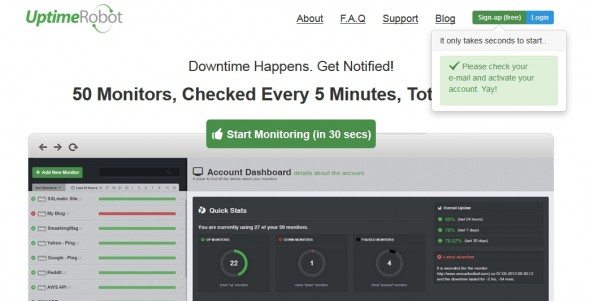
To stay in control of how the server works, we can use various tools. They are divided into paid and free ones. Once we have decided which hosting to choose, we can safely use such tools. One of them is, for example, UptimeRobot. In the free version you can add 50 sites to monitoring. Such tools will let you monitor the situation and you will be able to check whether your site works 24 hours a day. Every site hang and server unavailability will be recorded and sent to your site or, in some cases, even to your phone by SMS. A simple tool that will let you check how reliable your hosting is.
Choose the best hosting!
If you are at the stage of choosing hosting or only just getting to grips with the topic, you know perfectly well how broad the market of services and packages is. We hope that the information presented in this article will help you look at the subject of servers from the right angle and make the decision about which hosting to choose easier.
Try to define your real needs and the budget you will set aside for hosting, and choose a service that will give you everything you expect. If you need extra help choosing a server, get in touch with us.